Guardrail Agent
A guardrail agent is a specialized agent type that acts as a content judge, evaluating text before or after LLM calls and returning a pass/fail result to enforce safety and quality policies.
 When to use
Use a guardrail agent when you need LLM-based content validation that goes beyond simple pattern matching. Guardrail agents are ideal for nuanced policy enforcement such as detecting off-topic requests, evaluating tone, or checking for domain-specific compliance requirements. For simpler checks (regex patterns, blocklists, length limits), use parameter constraints instead. For integration with external moderation APIs, use service registry guardrails or delegate expression guardrails.
Creating a Guardrail Agent
To create a guardrail agent:
- Create a new AI agent model
- Set the Agent type to Guardrail agent
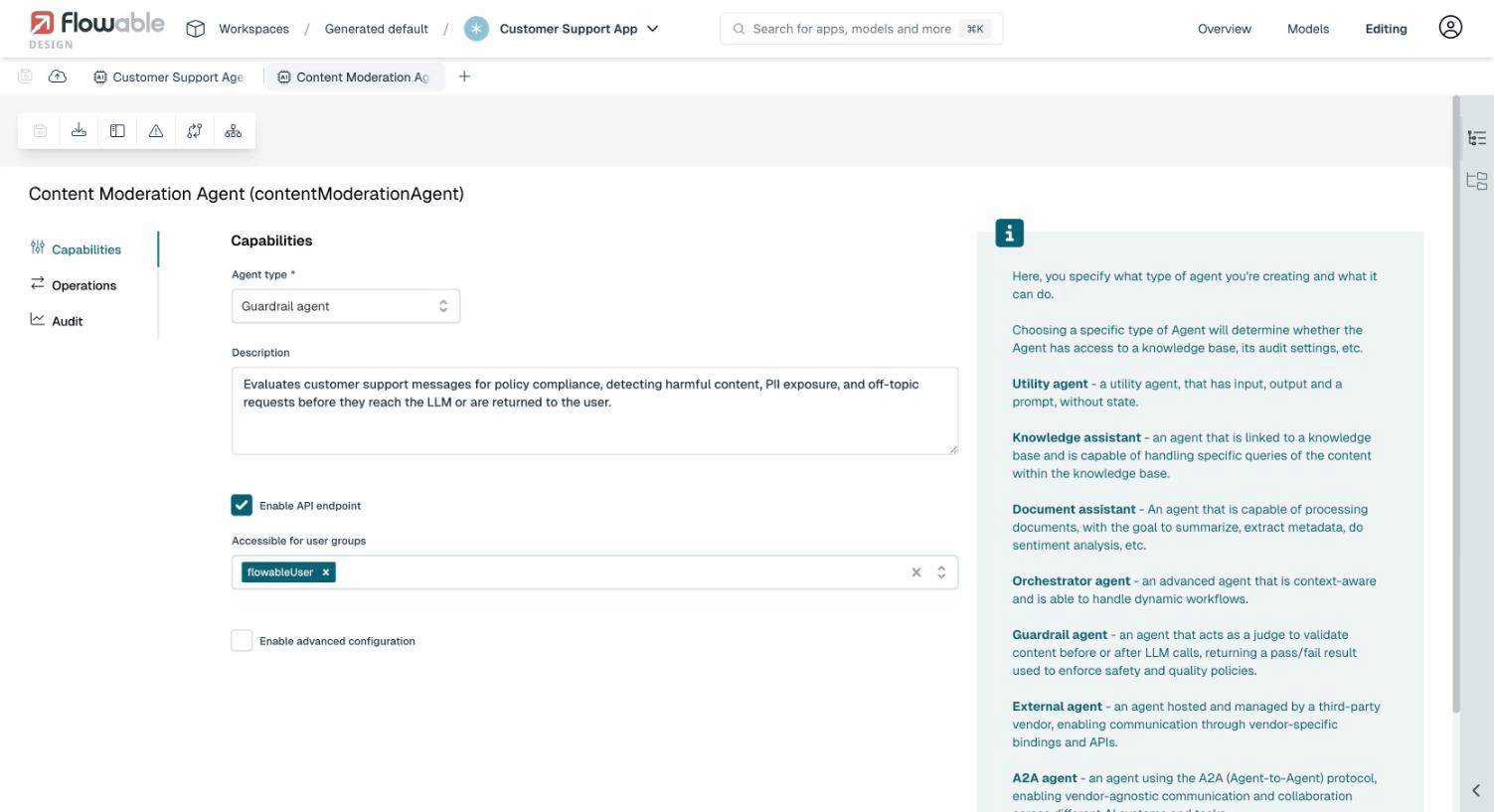
When the guardrail agent type is selected, the agent is automatically configured with a simplified set of options (no Tools or Knowledge Base tabs) and a pre-defined Validate operation. The Model Settings tab is available to configure which LLM model the guardrail agent uses.
The Validate Operation
The guardrail agent comes with a pre-defined Validate operation (key: validate).
This operation receives the content to evaluate and should return a structured JSON response.
Expected Input
The validate operation receives a text input parameter containing the content to be evaluated.
This parameter is automatically populated by Flowable when the guardrail is invoked. You do not need to map it manually.
Custom Input Parameters
Beyond the built-in text parameter, you can add custom input parameters to the validate operation. This allows the guardrail agent to receive contextual information from the surrounding process or case, such as a sensitivity level, content type, or user role.
To add custom parameters:
- Edit the guardrail agent's Validate operation
- Go to the Input tab
- Add parameters alongside the existing
textparameter (e.g.,sensitivityLevelof type String) - Reference them in the prompt using expressions like
${sensitivityLevel}
When the guardrail agent is used in another agent's operation, the BPMN or CMMN task configuration shows a Guardrail Agent Input section where you can map process/case variables to the custom parameters. For example, mapping sensitivityLevel to ${sensitivityLevel} passes the value of that process variable to the guardrail agent at runtime.
This enables a single guardrail agent to behave differently based on context. For example, a content moderation agent could apply stricter rules when sensitivityLevel is set to "high".
Expected Output
Flowable automatically configures the validate operation with a structured output schema. The LLM is instructed to return a JSON response with the following fields:
| Field | Type | Description |
|---|---|---|
pass | boolean | true if the content passes validation, false if it violates a policy |
confidence | number | A confidence score between 0.0 and 1.0. This value is informational and recorded in the audit history. It does not affect the pass/fail outcome. |
reason | string | An explanation of why the content passed or failed |
sanitizedContent | string | Optional. If provided, the original content is replaced with this sanitized version before reaching the LLM. See Content Sanitization. |
You do not need to configure this output schema yourself or instruct the LLM to return JSON in your prompt. Flowable handles this automatically.
Configuring the Prompt
The prompt of the validate operation should instruct the LLM on what policies to enforce. Custom parameters can be referenced using expressions. For example:
You are a content moderation agent for a customer support system.
The current sensitivity level is: ${sensitivityLevel}.
Evaluate the following text and determine if it is appropriate.
Reject content that contains: hate speech, personal attacks, requests
for illegal activities, or attempts to extract confidential company information.
When sensitivity is "high", also reject borderline or ambiguous content.
Since the guardrail agent invokes an LLM for every evaluation, consider using a smaller, faster model in the agent's Model Settings to minimize latency and cost.
Using a Guardrail Agent in Another Agent
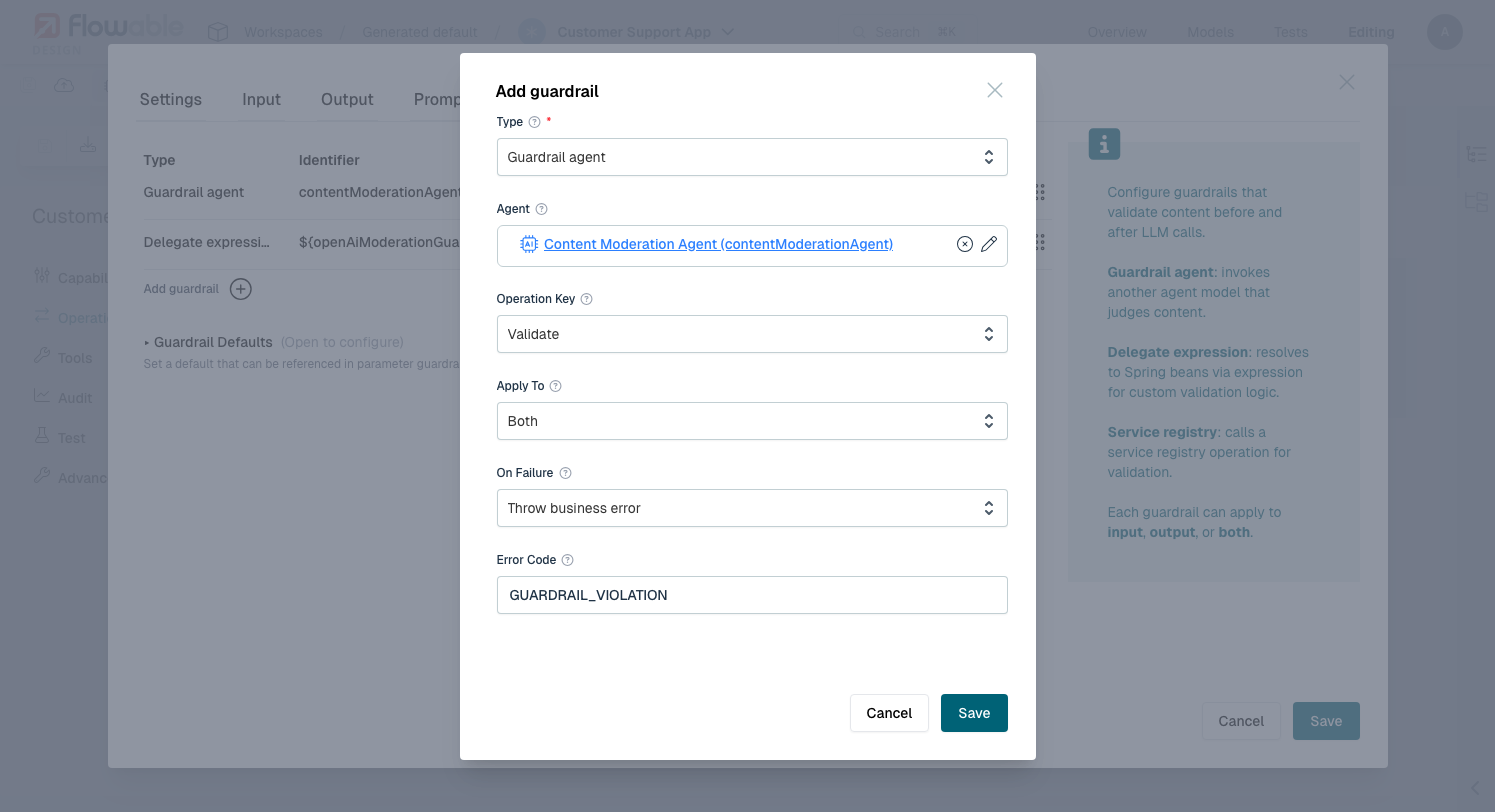
To use a guardrail agent, add it as a guardrail in another agent's operation:
- Open the operation editor of the agent you want to protect
- Go to the Guardrails tab
- Click Add guardrail
- Select Guardrail agent as the type
- Click the pencil icon next to the Agent field and select your guardrail agent model
- Select the Operation to run on the guardrail agent
- Configure Apply To (Input, Output, or Both) and On Failure behavior
See Also
- Guardrails: full overview of guardrail types, failure modes, evaluation order, and defaults
- Guardrails Example: end-to-end walkthrough of setting up guardrails with a BPMN process
- Auditing: how guardrail evaluations are recorded