Guardrails
Guardrails validate what goes into an LLM and what comes out, enforcing safety policies, quality standards, and compliance requirements for AI agents.
When deploying AI agents in production, especially in customer-facing scenarios, it is critical to control what goes into the LLM and what comes out. Without guardrails, an agent might process harmful user input (e.g., prompt injection attacks, hate speech), leak PII (Personally Identifiable Information) in LLM responses, or generate off-topic or non-compliant answers.
Examples of what guardrails can enforce:
- Input safety: Block requests containing profanity, hate speech, or attempts to manipulate the LLM
- PII protection: Detect and redact personal information (phone numbers, emails, credit card numbers) before it reaches the LLM
- Output quality: Ensure the LLM response stays on-topic, follows brand guidelines, or meets regulatory requirements
- Cost control: Reject invalid or nonsensical input before incurring LLM costs
Flowable supports three levels of guardrails, from lightweight to advanced:
- Parameter constraints: Simple, in-process validation rules on input/output parameters (e.g., max length, regex patterns, blocklists). No external calls. Cheapest and fastest.
- Service registry guardrails: Call an external service operation for validation. Good for standardized checks like content moderation or PII detection, configurable entirely in Flowable Design.
- Delegate expression guardrails: Invoke a custom Spring bean for full programmatic control, including content sanitization.
- Guardrail agents: Use an LLM-based agent to judge content. Best for nuanced, context-dependent validation that can't be captured by simple rules (e.g., "is this response on-topic for our product domain?").
These can be combined: parameter constraints catch the obvious problems cheaply, external systems handle standardized safety checks, and guardrail agents provide the final layer of intelligent validation.
Overview
When an agent operation is invoked, guardrails are evaluated in the following order:
- Parameter constraints are checked first
- Operation guardrails are evaluated in the order they are configured
For input validation, guardrails run before the LLM call. If a guardrail fails, the LLM call can be blocked entirely. For output validation, guardrails run after the LLM returns a response. If a guardrail fails, the response can be discarded.
Parameter Constraints
Parameter constraints are built-in validation rules configured directly on input and output parameters of an operation. They provide lightweight validation without requiring external calls.
Input parameter constraints are evaluated before the LLM call. If a constraint fails, the LLM is never invoked, preventing invalid, private or harmful content from reaching the model.
Output parameter constraints are evaluated after the LLM call. If a constraint fails, the LLM response is discarded. This catches cases where the LLM returns data that doesn't meet the expected format or policy.
For the full list of available constraint types, see Parameter Constraint Types.
Each parameter can have multiple constraints and an On Constraint Failure action that determines what happens when a constraint is violated. The available actions depend on whether the parameter is an input or output parameter:
- Throw business error: Throws a business error that can be caught by a BPMN error boundary event or CMMN fault sentry
- Log warning: Logs a warning and continues
- Skip (input only): Skips the LLM call, sets the skip flag and reason variables
- Reject (output only): Discards the LLM output, sets the reject flag and reason variables
- Default: Uses the failure mode from the operation's Guardrail Defaults
Operation Guardrails
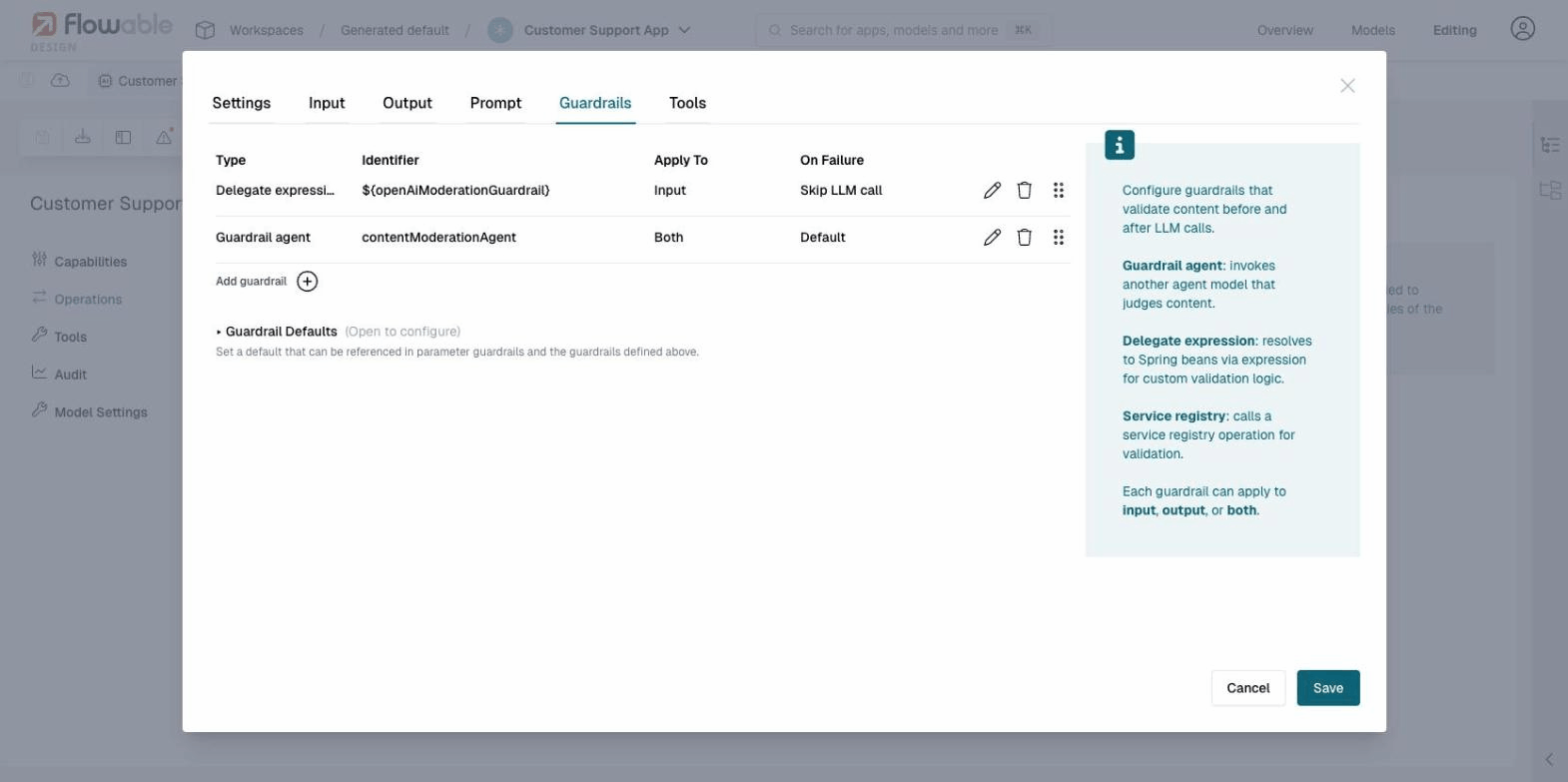
Operation guardrails are configured per operation in the Guardrails tab of the operation editor. Each guardrail validates content and returns a pass/fail result. Guardrails can apply to input, output, or both.
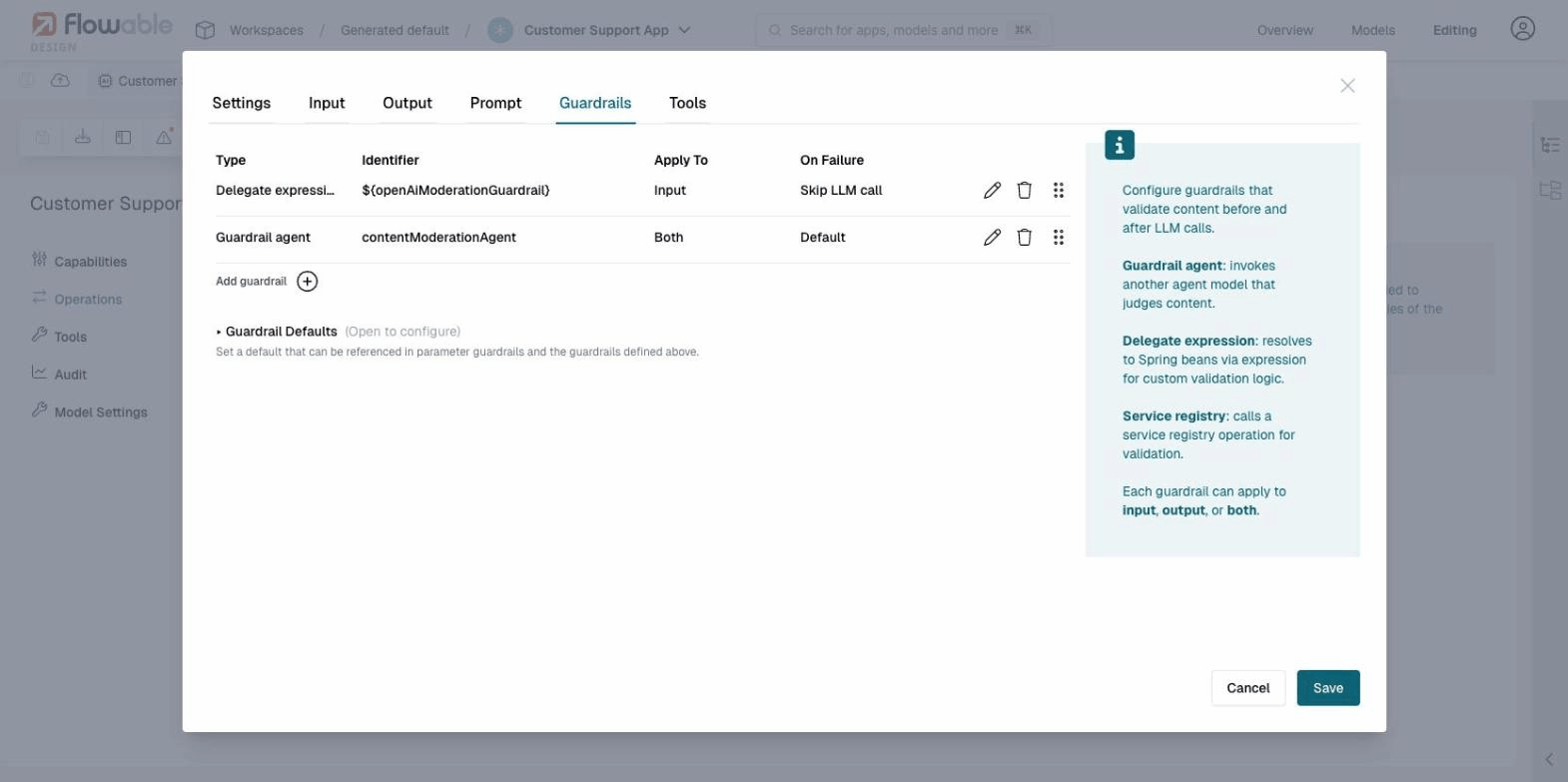
There are three types of operation guardrails:
Guardrail Agent
A guardrail agent references another agent model of the Guardrail agent type. This agent acts as a judge, using an LLM to evaluate whether content is safe, appropriate, or policy-compliant.
When configuring a guardrail agent, you select an existing guardrail agent model from your app and the operation to run on it. The guardrail agent receives the content to validate and returns a structured result indicating whether the content passed or failed validation, along with a confidence score and reason. The confidence score is informational: it is recorded in the audit history but does not affect the pass/fail outcome.
Service Registry
A service model guardrail calls a registered service model via the Flowable Service Registry. This is the recommended approach for most external guardrails, as it allows you to configure the integration entirely in Flowable Design without writing Java code.
When configuring a service model guardrail, you select:
- Service Model: a service model registered in the Service Registry
- Operation Key: the operation to invoke on the service
The service operation must follow a fixed contract for the content under validation:
| Parameter | Direction | Type | Required | Description |
|---|---|---|---|---|
text | input | string | yes | The content to validate. Automatically populated by Flowable when the guardrail runs; the name text is reserved. |
passed | output | boolean | yes | true if the content passed validation, false otherwise. |
reason | output | string | no | Explanation when validation fails. |
sanitizedContent | output | string | no | Optional sanitized version of the input. See Content Sanitization. |
Any service that follows this contract can be used as a guardrail, including REST APIs, script services, or custom connectors. See the guardrails example for a step-by-step walkthrough using a script service model.
Custom Input Parameters
Beyond the reserved text parameter, the service operation can declare additional input parameters (for example, locale, sensitivityLevel, or userRole). This lets the same guardrail service behave differently based on the context of the calling agent — for example, applying stricter rules for certain locales or routing different content types through different validation paths.
To use additional parameters:
- Add the extra parameter on the service operation's Input tab, alongside the existing
textparameter - In the BPMN or CMMN task that invokes the agent, open the Guardrail Parameters tab. A Guardrail Service Input section appears, grouped per configured service guardrail, listing each extra parameter
- Map each parameter to a process/case variable or expression (for example,
${userLocale})
At runtime, the mapped values are forwarded to the service invocation alongside text. The reserved text name cannot be overridden through this mapping.
Out-of-the-box Guardrail Connectors
Flowable provides ready-to-use service model connectors for popular content moderation APIs. These connectors can be downloaded and imported into your app in Flowable Design, giving you a working guardrail without writing any code.
OpenAI Moderation
The OpenAI Moderation API is a content classification service that detects harmful content across several categories: hate speech, harassment, sexual content, violence, self-harm, and more. It analyzes text and returns which categories were flagged, making it well suited as a first line of defense for user-facing AI agents.
The connector is pre-configured to call the OpenAI Moderation API, parse the response, and return results in the standard guardrail contract (passed/reason). To use it:
- Download the connector JSON file above
- In Flowable Design, open your app and go to Overview > New models > Import
- Import the downloaded JSON file as a Service model
- Configure the API key: open the imported service model, go to its configuration, and set the openAIKey secret in Flowable Control (or Flowable Hub). The connector is pre-configured to use a secret for authentication, which is the safest option. If preferred, you can change the authorization to a plain Bearer token instead.
- Add a guardrail to your agent operation with Type: Service registry, and select the imported OpenAI Moderation Guardrail service
The connector handles error cases (authentication failures, unexpected HTTP status codes) and extracts the flagged categories from the OpenAI response into a human-readable reason string.
To verify the guardrail is working, you can test with an intentionally inflammatory message such as "You are an idiot" (apologies for the example). The OpenAI Moderation API will flag this as harassment, and the guardrail will block the request.
Presidio PII Detection
Microsoft Presidio is an open-source PII detection and anonymization service. It analyzes text and detects entities such as names, phone numbers, email addresses, social security numbers, credit card numbers, and many more. It is well suited as a guardrail to prevent PII from reaching the LLM or appearing in responses.
Presidio runs as a separate service. For local development, you can start it with Docker:
docker run -d -p 5002:3000 mcr.microsoft.com/presidio-analyzer:latest
This starts the Presidio Analyzer API on http://localhost:5002.
The connector is pre-configured to point to http://localhost:5002, which matches the default Docker setup. For production deployments, you will need to change the base URL to point to your Presidio instance and most likely configure authentication.
To use it:
- Download the connector JSON file above
- In Flowable Design, open your app and go to Overview > New models > Import
- Import the downloaded JSON file as a Service model
- Add a guardrail to your agent operation with Type: Service registry, and select the imported Presidio PII Detection Guardrail service
The connector has two configuration parameters with default values that are not passed dynamically from the guardrail. If you need to change them, edit the service model directly:
- language: The language of the text to analyze (default:
en) - scoreThreshold: The minimum confidence score for a PII entity to be flagged (default:
0.5). Lower values catch more potential PII but may produce more false positives.
LLM Guard
LLM Guard by Protect AI is a comprehensive content scanning toolkit for LLM interactions. It provides a wide range of scanners including prompt injection detection, toxicity analysis, PII detection, jailbreak detection, ban topics, invisible text detection, and more. It is useful when you need multiple types of content analysis in a single guardrail.
LLM Guard runs as a separate API service. For local development, you can start it with Docker:
docker run -d -p 8000:8000 \
    -e AUTH_TOKEN="my-llm-guard-token" \
    -v $(pwd)/llm-guard-config/scanners.yml:/home/user/app/config/scanners.yml \
    laiyer/llm-guard-api:latest
LLM Guard requires a scanners.yml configuration file that defines which scanners to enable. Keep the number of active scanners small, as enabling too many can cause request timeouts. A minimal example:
input_scanners:
  - Toxicity
  - PromptInjection
See the LLM Guard documentation for the full list of available scanners and their configuration options.
The connector is pre-configured to point to http://localhost:8000 with a bearer token of my-llm-guard-token, matching the Docker command above. For production deployments, change the base URL and token to match your LLM Guard instance.
To use it:
- Download the connector JSON file above
- In Flowable Design, open your app and go to Overview > New models > Import
- Import the downloaded JSON file as a Service model
- Add a guardrail to your agent operation with Type: Service registry, and select the imported LLM Guard Guardrail service
LLM Guard with Sanitization
This is a variant of the LLM Guard connector that not only detects harmful content but also sanitizes PII by replacing it with placeholders before the text reaches the LLM. When used as an input guardrail, any detected PII is redacted and the LLM receives the sanitized version instead of the original. The original user input is preserved in the audit history.
For example, the input:
My name is John Smith and my email is john@example.com. My phone is 555-123-4567.
is sanitized to:
My name is [REDACTED_PERSON_1] and my email is [REDACTED_EMAIL_ADDRESS_1]. My phone is [REDACTED_PHONE_NUMBER_1].
The LLM processes the redacted version and never sees the original PII.
If the content fails a non-sanitizable scanner (e.g., toxicity or prompt injection), the guardrail blocks the request as usual. Sanitization only applies when PII is detected and the Anonymize scanner is enabled.
For this connector to work, the LLM Guard scanners.yml must include the Anonymize scanner:
input_scanners:
  - type: Anonymize
  - type: Toxicity
output_scanners:
  - type: Toxicity
The setup steps are the same as for the regular LLM Guard connector above: run the Docker container with the scanners.yml mounted, then import and configure the service model in Flowable Design.
Guardrails AI
Guardrails AI is a modular validation framework with over 70 validators available from the Guardrails Hub, including toxicity detection, PII scanning, prompt injection detection, and custom validators. Guards are composed from individual validators, making it easy to build a validation pipeline tailored to your use case.
Guardrails AI runs as a separate API server. For local development, install and start it following the Guardrails AI server quickstart. The API will be available on http://localhost:8000 by default.
The connector is pre-configured to call a guard named content-safety at http://localhost:8000. You will need to create this guard in your Guardrails AI installation, or change the URL path in the service model to match the name of your guard. For production deployments, change the base URL and configure authentication as needed.
The connector has a numReasks parameter (default: 0) that controls how many times Guardrails AI will re-prompt the LLM to fix validation failures. This is not passed dynamically and should be changed in the service model if needed.
To use it:
- Download the connector JSON file above
- In Flowable Design, open your app and go to Overview > New models > Import
- Import the downloaded JSON file as a Service model
- Add a guardrail to your agent operation with Type: Service registry, and select the imported Guardrails AI Guardrail service
Content Sanitization
External guardrails and guardrail agents can rewrite content before it reaches the LLM by returning sanitized content in the result. This is useful for redacting PII, removing sensitive data, or normalizing input, while still allowing the request to proceed.
Sanitization only applies during the input phase. When an input guardrail returns sanitized content, the user message sent to the LLM is replaced with the sanitized version. The original user input is preserved in the audit history.
For service registry guardrails, the service operation returns a sanitizedContent output parameter alongside passed and reason. For guardrail agents, the LLM can return a sanitizedContent field in its structured output. See the LLM Guard with Sanitization connector for a working example using a service model.
Delegate Expression
A delegate expression guardrail uses a Spring bean expression (e.g., ${openAiModerationGuardrail}) to invoke custom Java-based validation logic. This is useful when you need full programmatic control over the validation and sanitization logic.
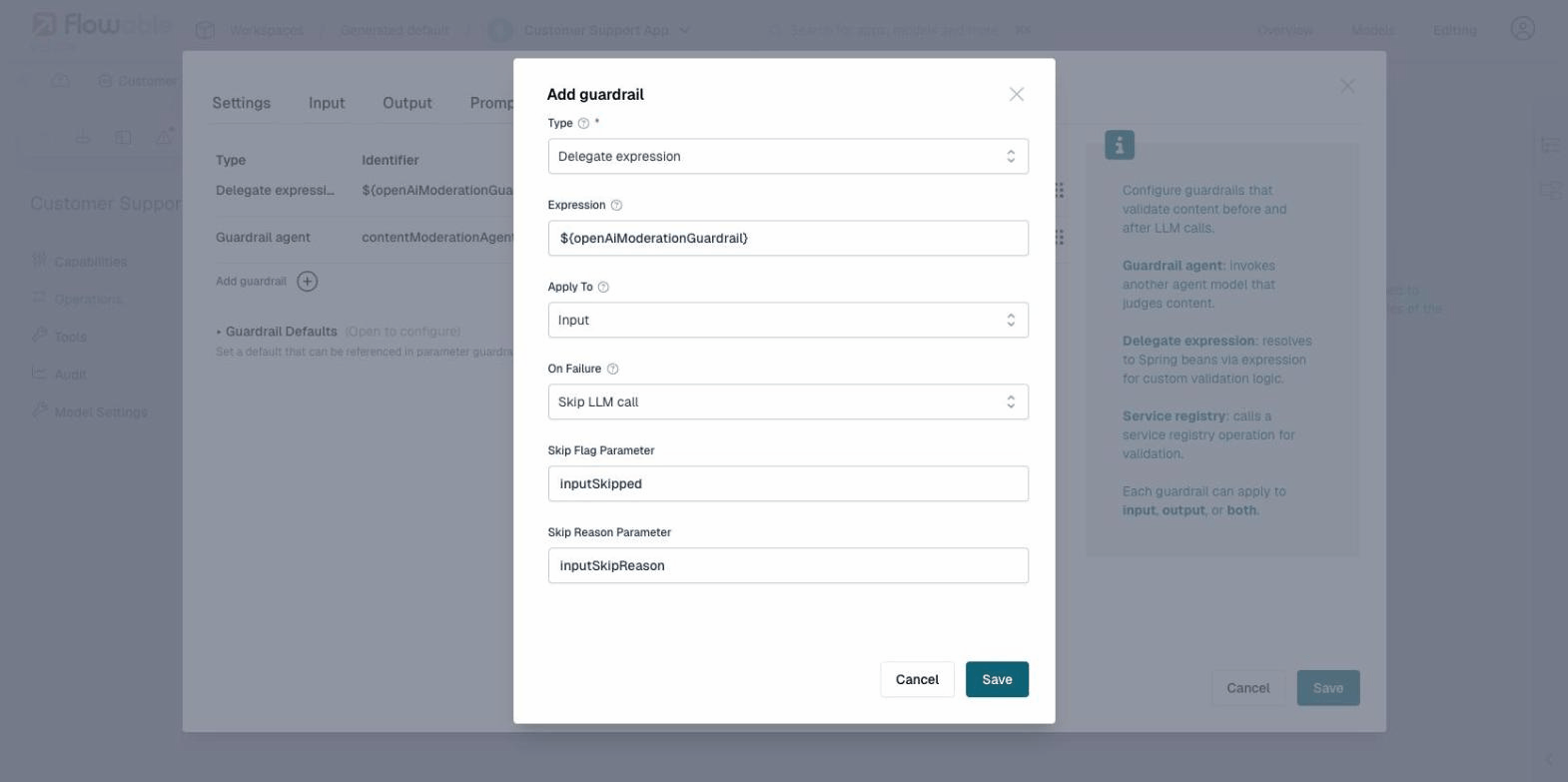
Implementing a custom delegate expression guardrail (Java)
The expression must resolve to a Spring bean that implements the ExternalGuardrailInvoker interface:
public interface ExternalGuardrailInvoker {
    ExternalGuardrailInvocationResult invoke(ExternalGuardrailInvocationRequest request);
}
The request provides the content being validated, whether it applies to input or output, the agent key, operation key, and resolved parameters.
The result indicates whether the content passed, an optional reason for failure, and optionally sanitized content.
// Content is safe
ExternalGuardrailInvocationResult.pass().build();

// Content is blocked
ExternalGuardrailInvocationResult.fail("PII detected in request").build();

// Content was sanitized (e.g., PII redacted before reaching the LLM)
ExternalGuardrailInvocationResult.pass()
    .sanitizedContent("Please help [PERSON] at [PHONE]")
    .build();
Failure Modes
When a guardrail detects a violation, the configured On Failure action determines the behavior. The available failure modes depend on whether the guardrail applies to input or output:
| Failure Mode | Input | Output | Behavior |
|---|---|---|---|
| Throw business error | yes | yes | Throws a business error with an error code that can be caught by a BPMN error boundary event or CMMN fault sentry. |
| Log warning | yes | yes | Logs a warning message and continues execution normally. |
| Skip | yes | no | Skips the LLM call entirely. The LLM is never invoked. |
| Reject | no | yes | The LLM call has already happened, but the output is discarded. |
| Default | yes | yes | Uses the failure mode configured in the Guardrail Defaults section. |
Throw Business Error
Throws a business error that interrupts the current execution. Unlike a regular exception, a business error is a structured error with an error code that can be caught by:
- A BPMN error boundary event attached to the agent task (or a call activity containing it)
- A CMMN fault sentry on the task or stage
The default error code is GUARDRAIL_VIOLATION. This can be customized per guardrail or in the Guardrail Defaults, allowing different guardrails to throw different error codes that route to different error handling paths.
When a business error is caught by a boundary event or fault sentry, the transaction completes normally within the error handling path. This is different from an uncaught exception, which would cause a transaction rollback. If no matching error boundary or fault sentry is defined, the business error propagates as an exception and the transaction rolls back.
The business error includes additional data that is available as variables in the error handling scope:
guardrailReason: the violation messageguardrailSource: the parameter name or service that failedguardrailSourceType:"parameter"or the guardrail typeguardrailPhase:"input"or"output"
This works across engines: a guardrail violation inside a CMMN case that is called from a BPMN process propagates the business error back to the BPMN level, where it can be caught by an error boundary event on the call activity. The reverse (BPMN called from CMMN) also works.
When to use: For hard policy violations that should never be allowed through, such as detecting prompt injection attacks or content that violates legal requirements. The business error approach gives you full control over how the error is handled in the surrounding process or case, including routing to review tasks, sending notifications, or logging the incident.
Log Warning
Records the violation in the logs but allows execution to continue as if the guardrail passed.
When to use: During development and testing, to observe what guardrails would catch without blocking users. Also useful in production for guardrails where you want visibility into borderline content without impacting the user experience (e.g., monitoring for emerging abuse patterns).
Skip (Input Only)
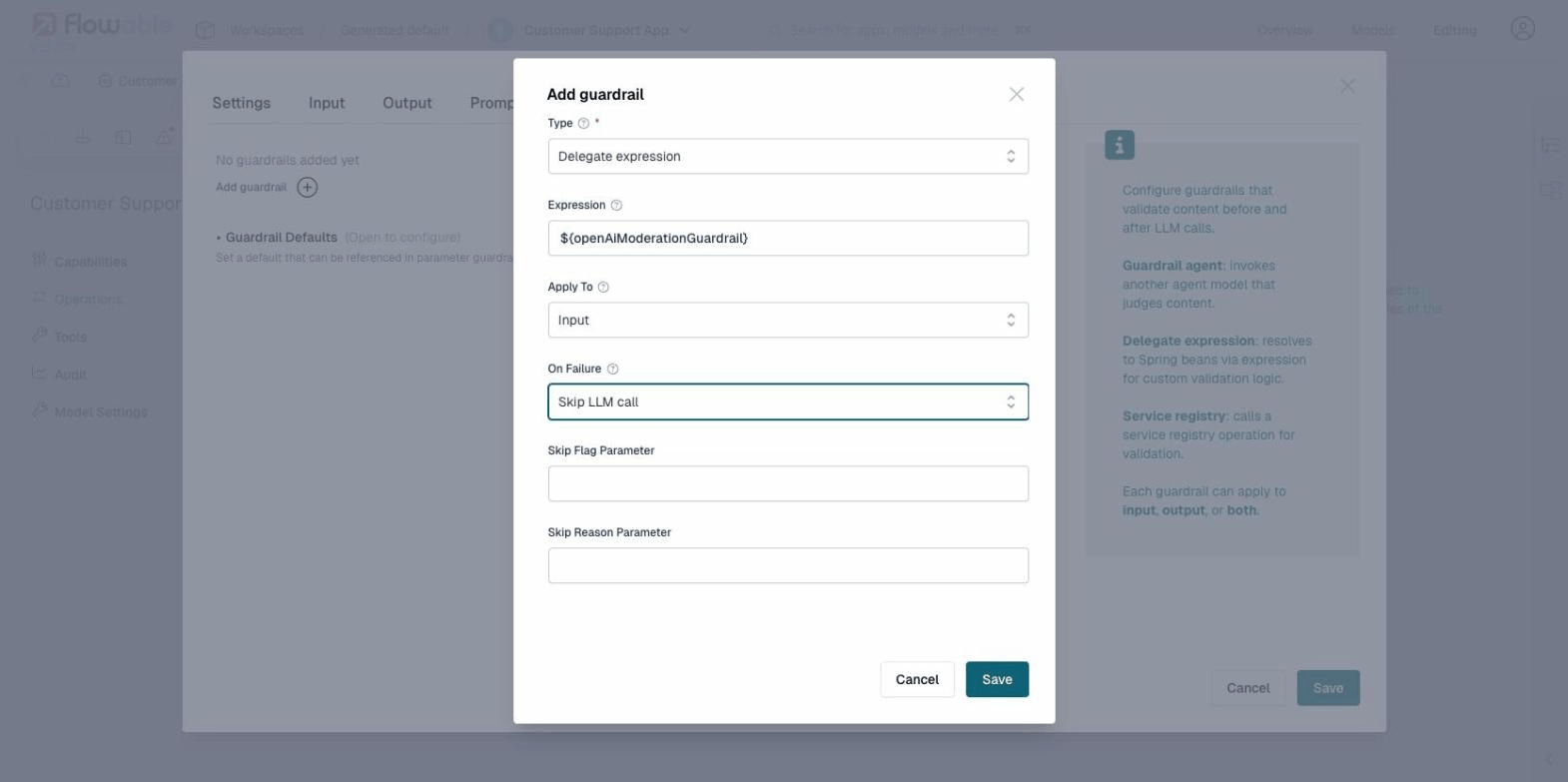
The LLM is never called. The configured Skip Flag Parameter is set to true and the Skip Reason Parameter contains the violation reason.
When to use: When you want the surrounding process or case to handle the situation gracefully, for example by returning a canned response ("I can't help with that") or routing to a human agent. This saves LLM cost and latency compared to throwing a business error, while giving the process designer full control over the user experience.
Reject (Output Only)
The LLM has already been called, but the response is discarded. The configured Reject Flag Parameter is set to true and the Reject Reason Parameter contains the violation reason.
When to use: When the LLM might generate responses that violate policy (e.g., hallucinated content, off-topic answers, or inappropriate language) and you want the process to decide what happens next: retry with a different prompt, return a fallback message, or escalate to a human.
Default
Resolves to the failure mode configured in the operation's Guardrail Defaults.
When to use: When you have multiple guardrails and want consistent failure behavior without configuring each one individually. Set the defaults once at the operation level, and individual guardrails inherit them.
See the guardrails example for a worked example showing how to use skip and reject flags in a BPMN process.
When Skip or Reject is selected, additional fields appear for configuring the parameter names:
Guardrail Defaults
Each operation has a Guardrail Defaults section where you can set default failure behavior for all guardrails that use the Default failure mode. This allows you to configure common defaults once rather than repeating them on each guardrail.
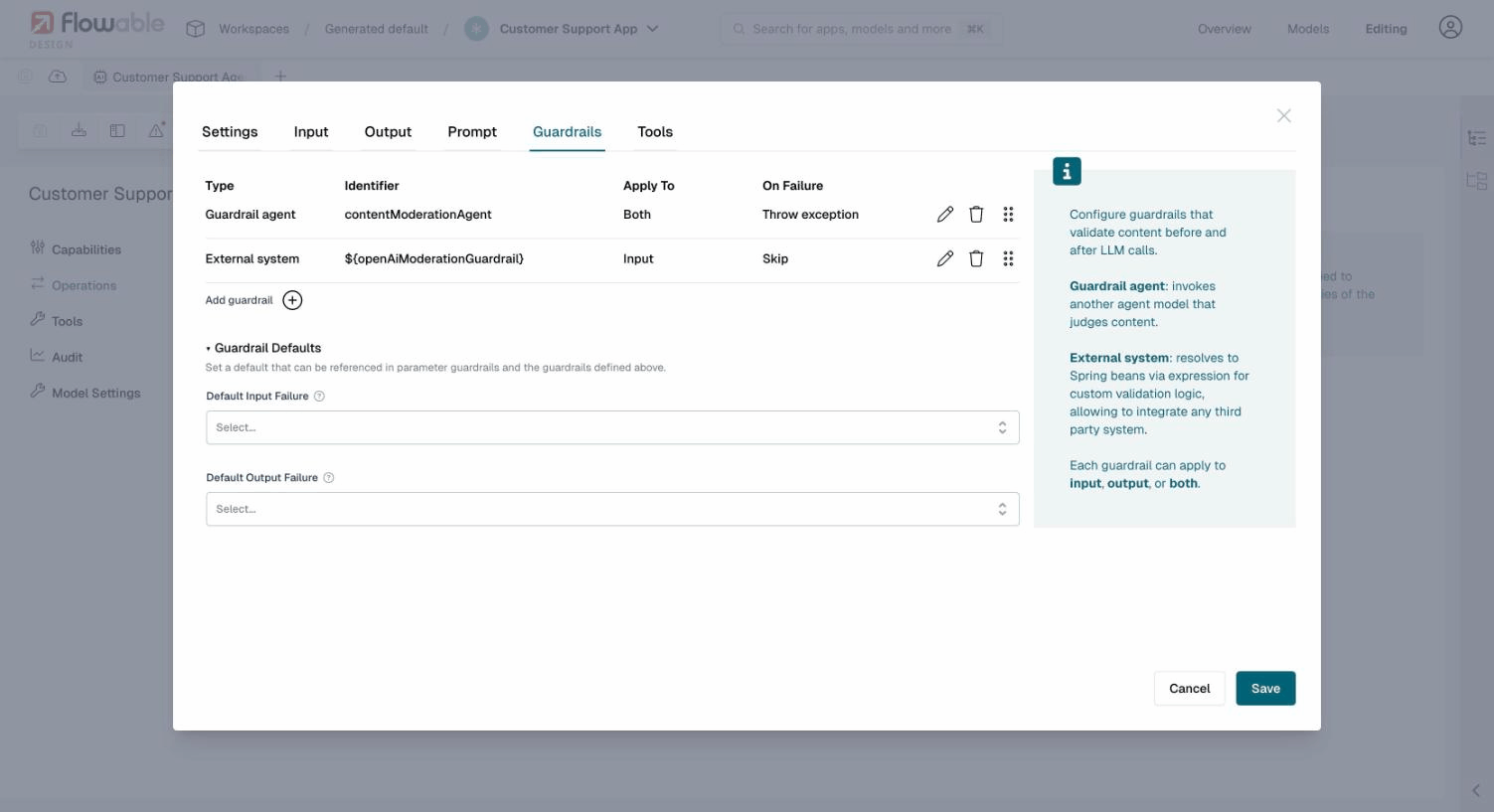
The defaults include:
- Default Input Failure: The failure mode applied to input guardrails set to "Default"
- Skip Flag Parameter / Skip Reason Parameter: Variable names used when the default input failure is "Skip"
- Default Output Failure: The failure mode applied to output guardrails set to "Default"
- Reject Flag Parameter / Reject Reason Parameter: Variable names used when the default output failure is "Reject"
Evaluation Order
Guardrails within an operation are evaluated in the order they appear in the list. You can reorder guardrails using drag-and-drop on the reorder handle (the six-dot icon on the right side of each guardrail row).
When multiple guardrails are configured, evaluation stops at the first violation. The remaining guardrails are not evaluated, and the failure mode of the violating guardrail is applied immediately. The order of guardrails in the list therefore determines which violation takes effect when multiple guardrails would otherwise fail.
It is recommended to place guardrails with lower latency and cost (such as a single moderation API call) before guardrails that require a full LLM invocation (such as guardrail agents) to fail fast and minimize cost.
 Alternative: LLM Proxy Solutions
Some guardrail solutions like NVIDIA NeMo Guardrails take a different approach: instead of validating content before or after the LLM call, they act as a proxy that sits between your application and the LLM. The proxy intercepts requests, applies guardrails, and forwards safe requests to the actual LLM.
These solutions do not require Flowable's guardrails configuration at all. Instead, configure the agent's Model Settings to point to the proxy endpoint as if it were the LLM. The proxy handles input/output validation transparently, and the agent operates as usual without any guardrail-specific configuration.
This approach can be combined with Flowable's built-in guardrails for defense in depth: let the proxy handle broad safety policies at the LLM level, while Flowable's guardrails enforce application-specific rules at the operation level.
Auditing
All guardrail evaluations are recorded in the agent invocation history, regardless of outcome. This includes guardrails that passed, failed, were skipped, rejected, or produced a warning. Even when a guardrail is configured with Log warning and execution continues normally, the evaluation is still recorded as an exchange in the timeline.
Each recorded evaluation includes:
- The content that was validated
- Whether the guardrail passed or failed
- The failure mode that was applied (if applicable)
- The reason for failure (if applicable)
This provides full transparency into why an invocation was blocked, skipped, or allowed. Guardrail audit entries can be viewed in Flowable Control alongside other agent exchanges.
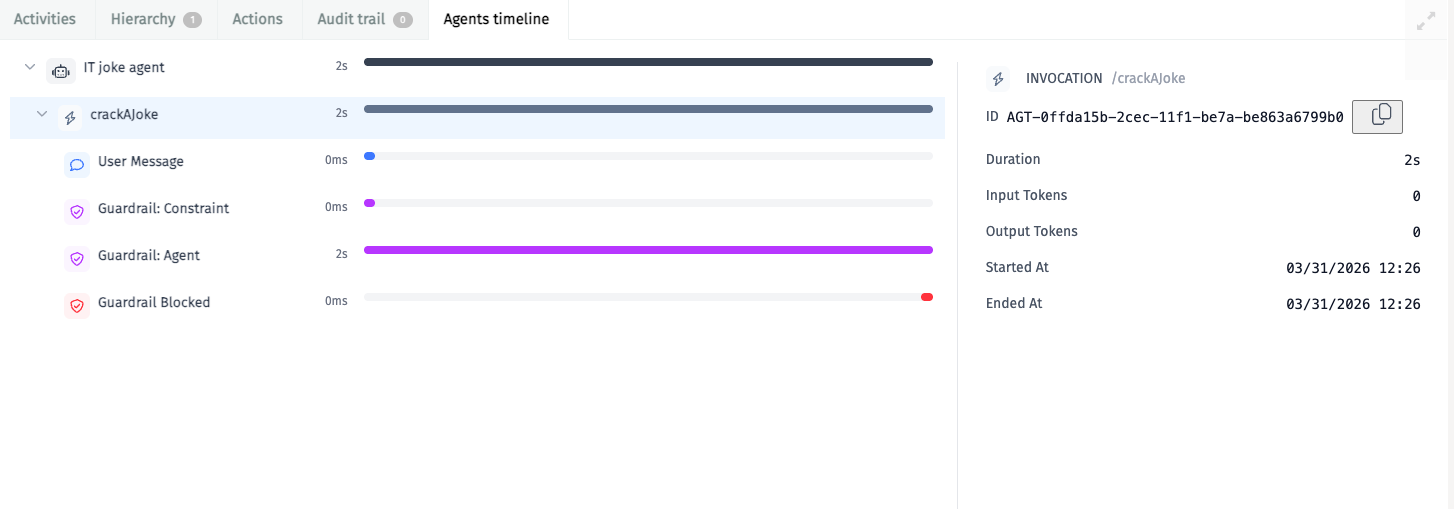
The Agents timeline in Flowable Control shows each guardrail evaluation as a separate entry in the invocation timeline. When a guardrail blocks a request, the timeline distinguishes between Input Skipped (input guardrail prevented the LLM call) and Output Rejected (output guardrail discarded the LLM response), along with the specific reason from the guardrail. In the example below, a constraint check and a guardrail agent evaluation were both executed, and the guardrail agent blocked the request:
See Auditing for more information on agent audit logging.