Document Events
Introduction
A document event is a content engine lifecycle signal, for example a document being created, renamed, moved, or deleted. Flowable provides several ways to subscribe to these signals and trigger a process or case when a matching document changes:
- BPMN Document start event starts a new process instance.
- BPMN Document event catch is an intermediate catching event waiting inside a running process.
- BPMN Document boundary event is a boundary event attached to an activity in a process.
- CMMN Document event listener is a case-level event listener.
- CMMN case start is configured directly on the Case Plan Model and starts a new case instance when a matching document event arrives.
All variants share the same configuration: which lifecycle events to react to, where the document must live, an optional filename filter, an optional content model filter, and the variable(s) that expose the matched content item to the instance.
Configuration
The properties are identical across the variants and are configured under the Document event section in the Design editor. Start variants (BPMN process-level Document start event and CMMN case start on the Case Plan Model) accept a smaller subset, because there is no running instance scope to anchor against until the matching event arrives.
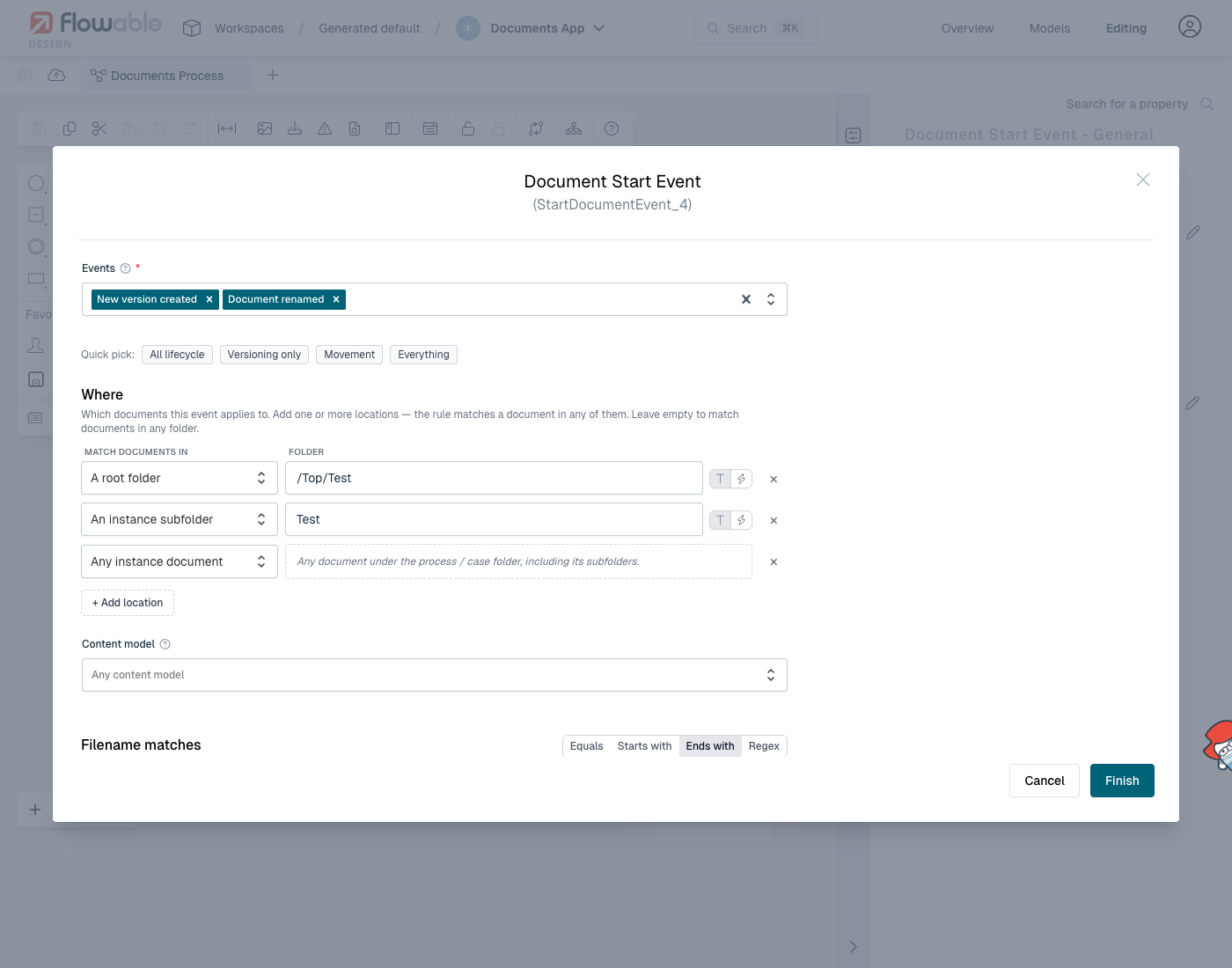
Events
The Events dropdown selects which document lifecycle operations create a subscription. One subscription is registered per selected event.
| Value | UI label | Triggered when |
|---|---|---|
created | Document created | A new content item is saved. |
contentUpdated | Document content updated | The binary content of an existing document is replaced. |
newVersionCreated | New version created | A new version of an existing document is saved. |
revertedToVersion | Reverted to version | A previous version of a document is restored as the current one. |
renamed | Document renamed | The filename of an existing document changes. |
moved | Document moved | A document is moved between folders. |
copied | Document copied | A document is copied. The event carries the new copy. |
metadataUpdated | Metadata updated | The metadata of a document is updated without touching its content. |
definitionSet | Content model set | A content model definition is attached to a document. |
deleted | Document deleted | A document is deleted. |
Quick-pick presets group the most common combinations: All lifecycle, Versioning only, Movement, Everything.
At least one event must be selected. The activity is deployment-rejected if the list is empty or contains an unsupported value.
Locations
The Where section restricts the subscription to documents in one or more folders. Each row creates an independent location, and a document matches when it satisfies any row. Leaving the list empty matches documents in any folder.
| Scope | UI label | Folder value |
|---|---|---|
root | A root folder | Folder path or an expression that resolves to one. A leading / makes the path absolute (for example /Inbox resolves to the Inbox root folder). Without a leading / the path is resolved relative to the configured root folder (for example Inbox resolves to /Top/Inbox when /Top is the configured root). |
instance | An instance subfolder | Relative path under the running process or case instance's scope folder (for example Attachments). Must not start with /. |
scope | Any instance document | No path. Matches any document under the running scope's content folder, including its subfolders. |
The scope folder resolver walks to the outermost canonical scope folder, so nested subfolders that belong to the same scope still correlate to the host instance.
Folder paths are validated at deploy time. A path that resolves to no segments (for example a literal /) is rejected, as is a path that contains an empty or whitespace-only segment. Paths that contain a JUEL expression (${...} / #{...}) are resolved at runtime and bypass the static segment check.
The instance and scope rows require a running scope and are therefore not allowed on start variants (BPMN process-level Document start event and CMMN case start). They are allowed on a Document start event placed inside an event sub-process, because that variant is activity-bound to the parent process instance.
Content model
The optional Content model field restricts matches to documents that are bound to a specific content model definition. Leave it empty to match documents of any content model (or of no model at all).
Filename matches
The optional Filename matches filter narrows matches by the content item's filename. Comparisons are case-insensitive.
| Mode | UI label | Semantics |
|---|---|---|
equals | Equals | Exact filename match. |
startsWith | Starts with | Filename prefix match. |
endsWith | Ends with | Filename suffix match, useful for extensions such as .pdf. |
regex | Regex | Java regular expression. The pattern is compiled at deploy time and rejected if it does not compile. |
The filename filter is rejected on start variants (BPMN process-level Document start event and CMMN case start), because there is no behavior path that could re-subscribe after a filter miss once the instance has already been spawned. It is allowed on every other variant, including a Document start event inside an event sub-process.
Variable name and List variable name
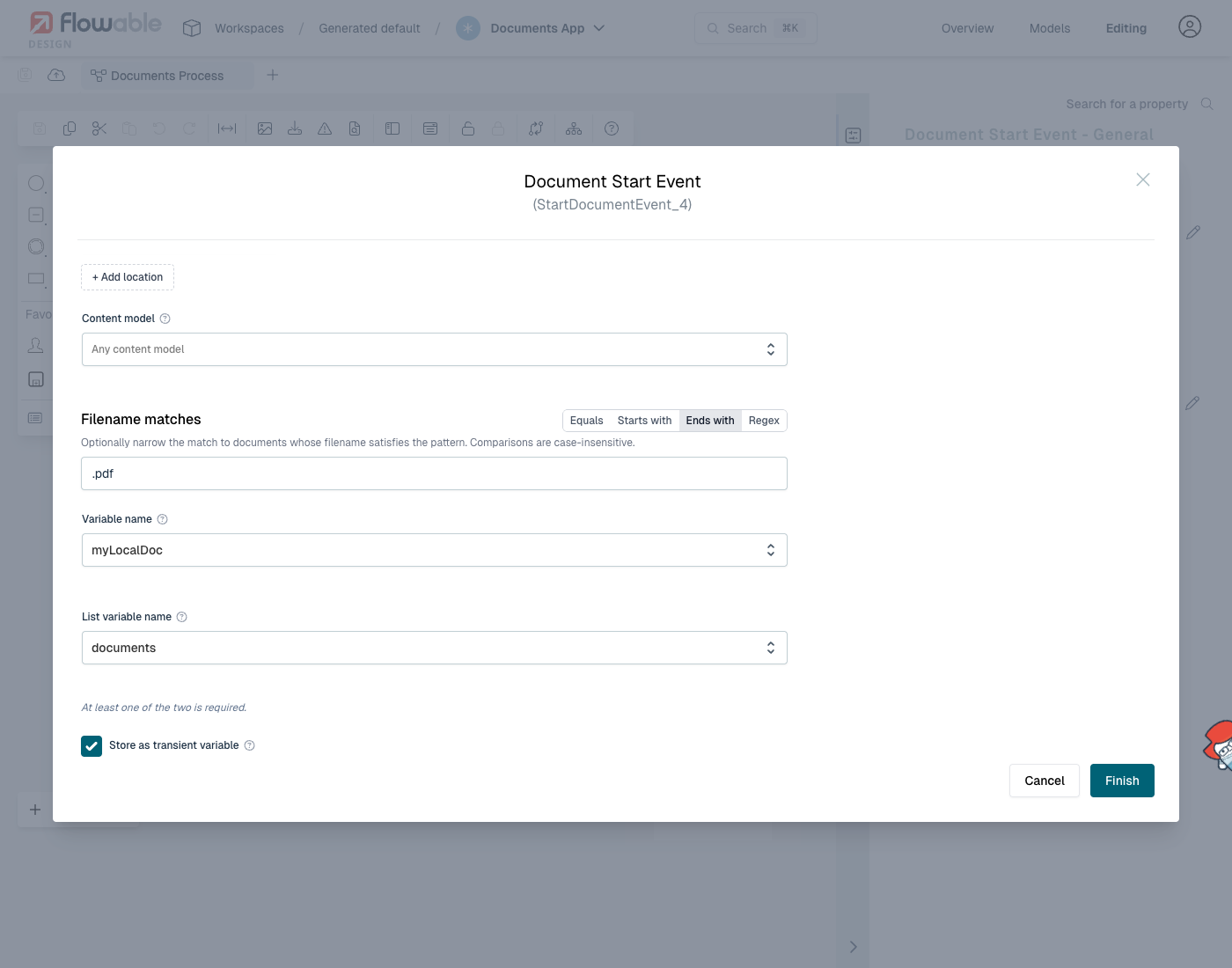
Each fired event exposes the matched CoreContentItem as a variable. Two outputs are supported and at least one must be configured:
- Variable name: the single content item that triggered this firing is bound to this variable name. Optionally marked Stored as transient variable to discard the value when the instance ends.
- List variable name: every matched content item is appended to a list variable. The list is created at the process / case instance if it does not exist yet; appending the same content item twice is rejected to keep the list deduplicated.
Both names must be valid identifiers ([A-Za-z_][A-Za-z0-9_]*) and must differ from each other.
The list variable requires a running scope to append to and is therefore not allowed on start variants (BPMN process-level Document start event and CMMN case start).
Re-subscription and non-interrupting variants
The Document event catch and Document event listener consume their subscription on the first matching event. A non-interrupting Document boundary event and a non-interrupting event sub-process Document start event stay armed and continue to fire each time a matching event arrives, until the host activity or instance terminates.
Validation rules
The following are checked at deploy time and surfaced as Design validation errors:
- Lifecycle is required: at least one event must be selected, and every selected event must be one of the supported values.
- Variable name or list variable name is required: at least one of the two must be set; both must be valid identifiers and must differ.
- List variable not allowed on a start variant (process-level Document start event or CMMN case start).
- Folder path:
rootandinstancerows require a non-empty path; the path must not contain empty or whitespace-only segments;instancepaths must be relative. - Instance / scope location not allowed on a start variant.
- Filename filter not allowed on a start variant.
- Filename regex: the pattern must compile.
Further reading
- Content models define the metadata, versioning and types of the documents these activities react to.